Google Finance API Alternative: GOOGLEFINANCE Limits and Real-Time Stock Prices in Google Sheets
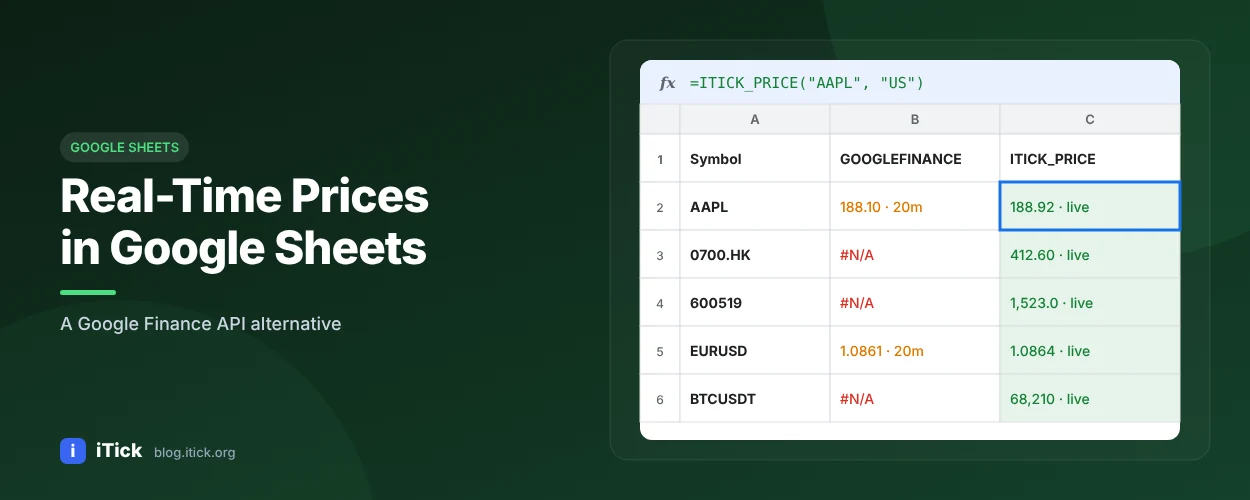
Google Finance API Alternative: GOOGLEFINANCE Limits and Real-Time Stock Prices in Google Sheets
Searching for "Google Finance API" usually ends in confusion: old tutorials point to endpoints that no longer exist. The short version: Google deprecated its Google Finance API in 2011 and later shut it down. What remains is the GOOGLEFINANCE() function inside Google Sheets - useful, but limited. This guide explains those limits and shows how to get real-time prices into Sheets with an API instead.
How the GOOGLEFINANCE function works
      =GOOGLEFINANCE("NASDAQ:AAPL", "price")
=GOOGLEFINANCE("NASDAQ:AAPL", "close", DATE(2026,1,1), DATE(2026,10,1), "DAILY")
=GOOGLEFINANCE("CURRENCY:EURUSD")
Common attributes include price, priceopen, high, low, volume, marketcap, pe and change.
GOOGLEFINANCE limits (from Google's own help page)
| Limitation | What Google says |
|---|---|
| Delay | Quotes may be delayed by up to 20 minutes |
| Purpose | Provided for informational purposes only, not for trading |
| Professional use | Not for professional use in the financial industry or by other professionals |
| Apps Script / Sheets API | Historical data cannot be downloaded or accessed this way |
| Coverage | Not sourced from all markets |
For a personal watchlist that is fine. For anything you build on top of - a bot, a client report, a dashboard - you need a real data API.
Real-time stock prices in Google Sheets with Apps Script
- Create a free iTick API key.
- In Google Sheets, open Extensions > Apps Script and paste:
      const ITICK_TOKEN = "YOUR_API_TOKEN";

function ITICK_PRICE(code, region, asset) {
  asset = asset || "stock";
  const url = "https://api.itick.org/" + asset + "/quote?region=" + region + "&code=" + code;
  const res = UrlFetchApp.fetch(url, {
    headers: { accept: "application/json", token: ITICK_TOKEN },
    muteHttpExceptions: true
  });
  const body = JSON.parse(res.getContentText());
  return body.data ? body.data.ld : "N/A"; // ld = last price
}
- Use it like any formula:
      =ITICK_PRICE("AAPL", "US")
=ITICK_PRICE("700", "HK")
=ITICK_PRICE("EURUSD", "GB", "forex")
The free plan allows 5 REST calls per minute, so for large sheets cache results or move to a paid plan.
Historical data you can actually export
Because historical data from GOOGLEFINANCE cannot be read by Apps Script, many people end up copy-pasting. With the iTick historical data API you can pull OHLCV directly into Python:
      import requests, pandas as pd

bars = requests.get("https://api.itick.org/stock/kline",
                    params={"region": "US", "code": "AAPL", "kType": 8, "limit": 500},
                    headers={"accept": "application/json", "token": "YOUR_API_TOKEN"}).json()["data"]
df = pd.DataFrame(bars).rename(columns={"t": "time", "o": "open", "h": "high",
                                        "l": "low", "c": "close", "v": "volume"})
df["time"] = pd.to_datetime(df["time"], unit="ms")
df.to_csv("AAPL_daily.csv", index=False)
New to candle data? Read What is OHLCV data.
GOOGLEFINANCE vs iTick API
| GOOGLEFINANCE() | iTick API | |
|---|---|---|
| Delay | Up to 20 minutes | Real-time |
| Outside Sheets | No official API | REST + WebSocket |
| History via Apps Script | Not available | Available |
| Business use | Not permitted | Paid plans |
| Tick & order book | No | Yes |
FAQ
Is there a Google Finance API? No. It was deprecated in 2011 and later shut down.
Is GOOGLEFINANCE real-time? No - quotes may be delayed up to 20 minutes.
Can I get GOOGLEFINANCE history with Apps Script? No, Google blocks it. Use an API such as iTick instead.
What's the best Google Finance API alternative? One that works in Sheets and in code. iTick does both, for stocks, forex and crypto.